Generate Articles in WordPress
The Hunnt AI WordPress Plugin allows you to generate high-quality, culturally aware, and SEO-optimized articles directly inside your WordPress admin panel. This guide explains how to generate articles using the built-in Hunnt AI interface.
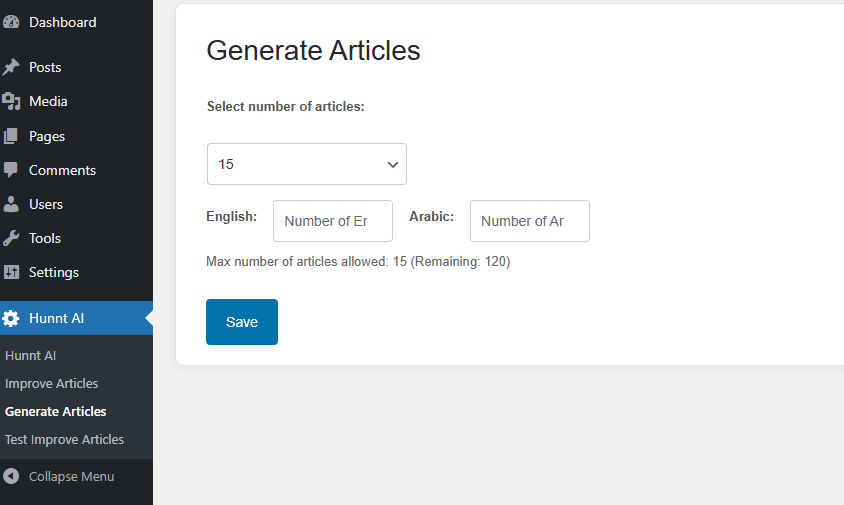
1. Access the Article Generator
Inside your WordPress admin panel, navigate to:
Hunnt AI → Generate Articles
This will open the article generation page where you can configure your request.
2. Select the Number of Articles
In the Select number of articles field, choose how many articles you want to generate. The maximum number depends on:
- Your active subscription plan
- The number of remaining article credits
3. Choose the Number of Articles Per Language
If your website supports multiple languages (e.g., Arabic and English), assign the number of articles for each language.
The total number of articles assigned across all languages must equal the total number selected — not more and not less.
Example:
- Selected total: 15 articles
- Arabic: 7 articles
- English: 8 articles
Total = 15 ✔ valid
4. Save Your Settings
After selecting the number of articles and distributing them by language, click Save to start the process.
5. Hunnt AI Agent Begins Working
Once saved, the Hunnt AI Agent will begin processing your request:
- Analyzing your website
- Studying your niche and competitors
- Applying cultural context
- Researching topics intelligently
- Generating professional, human-like content
- Automatically adding schema markup
- Creating internal links
- Full synchronization with WordPress
All generated articles will appear as drafts inside WordPress, ready for review and publishing. Additionally, all articles are automatically synchronized for publishing.
Summary
With the Hunnt AI WordPress Plugin, you can generate SEO-ready, professionally structured articles directly from WordPress with:
- Easy dashboard access
- Language-based article distribution
- Automatic schema
- Automatic internal linking
- Full synchronization