Edit Website Settings
The Website Settings section allows you to provide essential information about your website so the Hunnt AI Agent can analyze your niche, study your competitors, and generate accurate, high-quality content tailored to your business. These settings can be updated or modified at any time from your dashboard.
You can go to Manage Website by going to it from User Sidebar:

Website Settings Overview
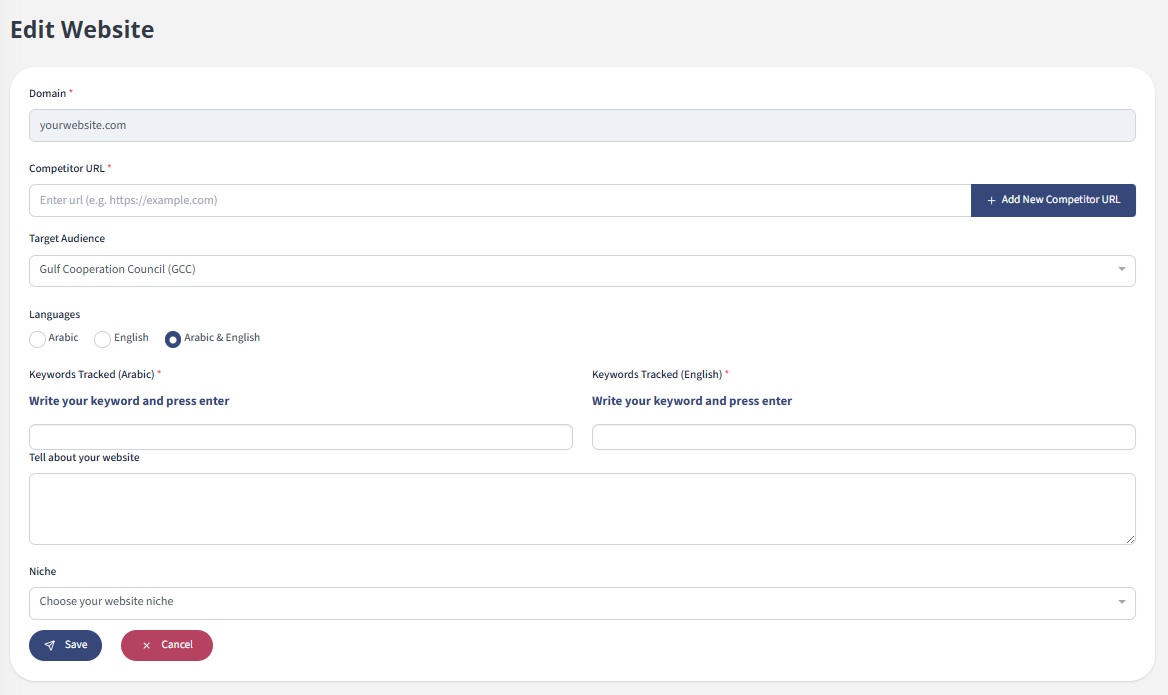
1. Competitor URLs
Add the URLs of your direct competitors — websites you want to outrank on search engines. You can add multiple competitor links. This helps the Hunnt AI Agent understand your competitive landscape and generate more strategic content.
2. Target Audience Regions
Specify your target market. This setting is extremely important because it influences how the Hunnt AI Agent analyzes content style, tone, and cultural nuances based on your audience.
3. Content Language
Select the language(s) you want your content to be generated in. We currently support:
- Arabic
- English
- You can choose both languages at the same time
4. Keyword Tracking
Add the keywords, main topics, and subjects you want the system to focus on. These keywords guide the Hunnt AI Agent to generate content around the exact themes that matter to your business.
5. Website Description
Provide a brief but detailed description of your website and business. This information helps the AI understand your industry, purpose, services, and positioning to deliver more precise and relevant SEO content.
6. Niche
Select the niche or industry your business operates in. This classification helps the HunntAI Agent tailor its analysis, keyword suggestions, and generated content to your specific field.
7. Site license key
The key which will be used for connecting with your website by WordPress Plugin or using our Hunnt AI API.
Final Notes
The accuracy of the Hunnt AI Agent depends heavily on the information you provide in your website settings. The more precise your data, the more powerful and effective your content results will be.